Carina Troubleshooting
High Performance Computing is futuristic and exciting…until it isn’t. We are collecting common problems and pitfalls here to get you back up and running quickly.
Connection & Startup Issues
It’s frustrating when you can’t connect! Here are the first things to check:
Are you on the Full-Tunnel Stanford VPN?

This is a common issue! Confirm that you are connected to the Stanford VPN using the full tunnel option.
Do you have space in your $HOME?

Running out of disk space will disrupt your work.
A lack of free disk space can cause Carina OnDemand and its apps to fail to connect, freeze up, or otherwise behave oddly.
The error messages may not tell you that disk space is the issue, but it is the most likely cause.
The good news is, you can solve the problem on your own. Your account will still allow you to connect via SSH when you are over your disk quota.
Connect via SSH, then check your disk usage. It is safe to do this on a login node.
The command to check your usage is: du -hs $HOME
Your $HOME quota is 25GB, and you should keep a few GB free for your applications to use.
If you are over your quota, move or delete files via the command line in your terminal to free up space. You should be able to access Carina OnDemand once space is available.
OnDemand Issues
My file upload or download failed
The OnDemand file manager has size limits: 130 MB per file upload and 1 GB per directory download. If your transfer exceeds these limits, it will fail silently or mid-transfer.
For larger files, use SFTP or the transfer node instead.
I can’t edit my files in file manager - the error is [filename] is not an editable file
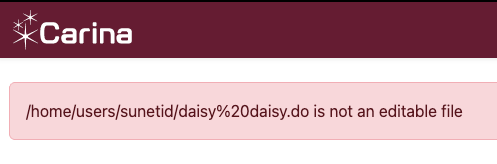
The most common reason for this is whitespace in a directory name or a file name. Carina OnDemand does not handle this gracefully. Try replacing the spaces with dashes or underscores and that should solve the problem.
I can’t change the directory/file names, am I doomed?
The good news is, this is particular to the file manager. The interactive applications do not have this restriction. If you launch a VS Code session, for example, you can edit the files even though the file or folder name includes whitespace.
My OnDemand shell session disconnected
The OnDemand shell (under Clusters > Carina Shell Access) disconnects after 15 minutes of inactivity and has a hard 30-minute maximum session length. If you need a longer terminal session, connect via SSH directly.
I specified a project folder as my working directory, but I keep getting put into $HOME
If your app session is starting in $HOME even though you requested a different path in the Working Directory field, the most likely cause is that there is a problem with the path you supplied. Check your input for typos, and confirm that the path already exists.
I’m in JupyterLab and can’t get to my /projects directory from $HOME
JupyterLab really wants you to stay in your home directory! The easiest workaround is to add a symlink to your project folder to your home directory. Here’s a quick tool to create the command, which you will run in a terminal on Carina, whether inside Carina OnDemand or an ssh connection.
Enter your information below and click the Generate button to create a copy & paste symlink command. The default project ID is main so leave that unless you have a project folder with a name like /projects/frankenstein/monster; in that case, frankenstein is the PI and monster is the project ID.
After running the command in a Carina terminal, the symlink will appear in your home directory and JupyterLab’s file browser will be able to navigate into it.
Login Node Issues
A command was killed on the login node with no clear error
Login nodes enforce strict per-user resource limits: 512 MB of memory and 25% of a CPU core. If your command exceeds these limits, the system will kill it — often without a helpful error message. You might see Killed, Out of memory, or the process may just disappear.
The login node is intended for light tasks like editing files, checking queues, and submitting jobs. Any real computation should be run on a compute node via Slurm.
To get an interactive compute session:
srun --pty bash
Slurm & Job Issues
My srun session disconnected
An interactive session started with srun is tied to your terminal connection. If your terminal window closes, your laptop sleeps, or your network drops, the session ends and any work in progress is lost.
For work that needs to survive a disconnection, submit it as a batch job with sbatch instead. If you need an interactive session that persists, a tool like tmux or screen can help — start one on the login node before running srun.
My batch job failed — where do I start?
First, check your output files. Unless you specified otherwise, Slurm writes job output to slurm-<jobid>.out in the directory where you submitted the job. That file contains both standard output and any error messages from your script.
If the output file doesn’t tell you enough, get more details about how the job ended:
scontrol show job <jobid>
Look at the JobState and ExitCode fields. An exit code of 0:0 means success; anything else indicates a failure. Common causes are running out of memory (OUT_OF_MEMORY), hitting the time limit (TIMEOUT), or an error in the script itself.
If the job is no longer in the queue, sacct can retrieve historical information:
sacct -j <jobid> --format=JobID,JobName,State,ExitCode,MaxRSS,Elapsed
Script Issues
This script worked on the old Carina, why doesn’t it work here?
The most likely cause is hard-coded paths that need to be updated for Carina 2.0.
The changes are documented here.
Another possibility is that the script requests a partition/queue name from the original Carina, such as gpu or gpu-long. Carina 2.0’s partitions are dev, normal, and long. GPUs are available on all three partitions, and most sbatch jobs should run on normal. Dev is for short interactive sessions, and long is for jobs that are expected to take more than two days.
CODEX error
Every time I enter a Codex command, I get an error like, WARNING: failed to clean up stale arg0 temp dirs: Directory not empty (os error 39)
This is not a Carina problem, it’s a Codex-on-HPC problem and OpenAI is aware of it. There is currently no work-around, but it is ignorable.