Using R on Carina
permalink: /r-quickstart
Welcome! This guide will help you get up and running with R on Carina. We’ll cover everything from starting a quick interactive session to submitting a longer job to the cluster.
Available R Versions
These R versions are available in Carina OnDemand and via module load:
- R/4.3.3
- R/4.4.3
- R/4.5.1 (current default)
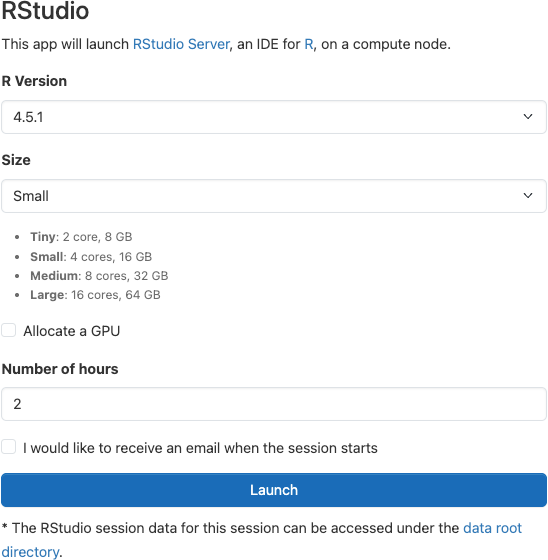
To use a specific version in OnDemand, select it in the session launch form. For command line, specify the version when loading the module, for example ml R/4.4.3.
Carina OnDemand
This web-based method is the easiest approach.
- Start an RStudio session
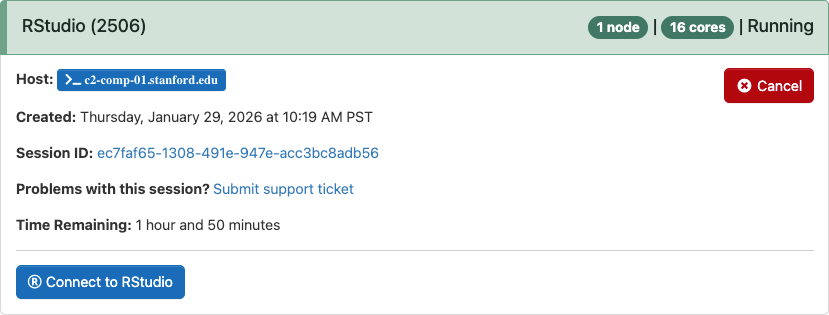
- Connect to your session from My Interactive Sessions
Loading the R Module
Before you can use R, you’ll need to let Carina know you want to use it by loading the R module. It’s as simple as typing this in your terminal:
ml R
-
Request compute resources via Slurm’s srun command (cannot run on login nodes):
srun -p normal -n 1 --cpus-per-task=8 --pty bashThis requests one node with 8 CPUs on the normal partition.
-
When you are on a computing node, load the R module. Note that R is an exception to the “all module names are lowercase” rule, and must be loaded with an uppercase R.
Load the default version:
module load Rorml R(module load and ml are interchangeable)Load a different version:
ml R/4.4.3 -
Start R:
R